Integrating Glam Halloween Web Clipart into Your Digital Design Workflow
Halloween marketing and content creation often fall into two distinct categories: the spooky and the sophisticated. For many brands, educators, and content creators, the traditional route of blood, gore, and darkness does not align with their aesthetic or audience expectations. This is where Glam Halloween Web Clipart becomes an essential asset in your digital toolkit. It bridges the gap between seasonal relevance and brand consistency, allowing you to participate in the cultural moment without compromising your visual identity. Whether you are a social media manager planning October campaigns, a blogger updating header images, or an entrepreneur designing email newsletters, understanding how to effectively integrate these assets can streamline your production process and elevate your final output.
The value of high-quality clipart lies not just in the image itself, but in how it fits into your broader workflow. When you have access to pre-designed, transparent PNG files with high resolution, you eliminate the time-consuming steps of creating complex illustrations from scratch or searching for low-quality freebies that require extensive editing. This article explores the practical implementation of glam-themed Halloween graphics, focusing on compatibility, efficiency, and strategic placement within your existing design processes.
Understanding the Asset Specifications and Quality Control
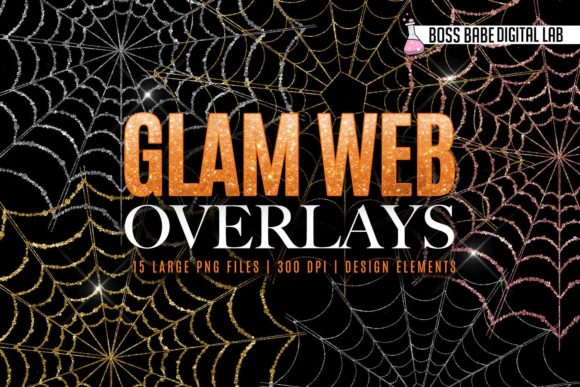
Before integrating any visual asset into a professional project, it is crucial to understand its technical specifications. The Glam Halloween Web Clipart package typically includes 15 large transparent clipart files at a resolution of 300 DPI (dots per inch). These two factors—transparency and resolution—are the pillars of versatile digital design.
Transparency, achieved through the PNG format, allows you to layer these elements over any background color, pattern, or photograph without a white box surrounding the image. This is particularly important for maintaining a cohesive look across different platforms. For instance, if your brand uses a specific pastel palette, you can place a glittery pumpkin graphic directly over your branded background without needing complex masking tools. The 300 DPI resolution ensures that while these are optimized for web use, they retain enough detail to look crisp on high-density displays, such as Retina screens on modern smartphones and tablets. This quality control measure prevents the pixelation that often plagues lower-resolution assets, ensuring your professional reputation remains intact.
Pre-Production: Planning and Compatibility Checks
Effective design begins with preparation. Before you open your design software, consider where these glam elements will serve your goals best. Are you updating your website’s hero section? Creating a series of Instagram stories? Designing printable party invitations? Identifying the end goal helps you select the right files from the 15 available options.
Compatibility is another key factor in the pre-production phase. These clipart files are designed to work seamlessly with popular design platforms like Canva, Adobe Photoshop, Illustrator, and various blog editors. However, it is important to note a specific limitation mentioned in the asset description: these files are perfect for editors that cannot add glitter or patterns to objects dynamically. This means the glitter effect is baked into the image. While this limits your ability to change the color of the glitter post-import, it significantly speeds up your workflow. You do not need to spend hours applying layer styles, blending modes, or texture overlays to achieve a sparkling effect. The visual impact is immediate and consistent.
To organize your workflow, create a dedicated folder for your seasonal assets. Download all 15 files and rename them descriptively (e.g., "glam-pumpkin-gold.png," "sparkle-cat-black.png"). This simple organizational step saves valuable time during the design phase, allowing you to drag and drop elements quickly rather than searching through generic file names.
Execution: Integrating Assets into Real Workflows
Once your assets are organized, the execution phase begins. Here is how you can integrate Glam Halloween Web Clipart into various common workflows:
Social Media Content Creation
Social media demands consistency and speed. For platforms like Instagram, Pinterest, and Facebook, visual appeal drives engagement. Use the glam clipart to create themed templates that can be reused throughout the month. For example, place a large, transparent glittery bat in the corner of your quote graphics. Because the background is transparent, the text remains readable, and the design feels intentional rather than cluttered.
When using tools like Canva, upload the PNG files to your "Brand Kit" or "Uploads" section. This ensures they are always accessible when you are creating on the fly. You can overlay these elements on top of your standard brand photos to give them a seasonal twist without altering the core imagery. This approach maintains brand recognition while signaling timely relevance to your audience.
Website and Blog Headers
Your website is your digital storefront, and seasonal updates can signal to visitors that your site is active and current. Instead of a complete redesign, use the clipart to accentuate existing headers. A subtle sparkle element near your call-to-action button or a glam pumpkin framing your blog title can add festive flair without overwhelming the user experience.
Since these files are high-resolution, they will load quickly and look sharp on desktop and mobile devices. Ensure you optimize the file size if necessary for web performance, but the original 300 DPI PNGs provide a excellent starting point for cropping and resizing without quality loss. This method is far more efficient than coding CSS animations or hiring a developer for minor seasonal updates.
Email Marketing and Newsletters
Email clients vary widely in how they render images. Using static, high-quality PNGs is one of the safest ways to ensure your design looks correct across Gmail, Outlook, and Apple Mail. Incorporate the glam Halloween elements into your newsletter headers or as dividers between sections. The transparent background allows these graphics to blend seamlessly with the HTML background colors of your email template. This creates a polished, professional look that enhances readability and keeps the focus on your message.
Post-Production and Long-Term Usability
After your designs are created and published, consider the long-term value of these assets. High-quality clipart is not a single-use item. By saving your layered design files (such as .PSD or .CANVA links), you can easily revisit and repurpose these elements next year. This reduces the cost and time associated with annual content creation.
Furthermore, analyze the performance of your glam-themed content. Did posts with the glittery pumpkins receive higher engagement? Did the updated website header increase click-through rates? Use these insights to refine your strategy for future holidays. The versatility of the Glam Halloween Web Clipart allows it to fit into both luxury-focused and playful brand narratives, making it a flexible tool in your ongoing marketing efforts.
It is also worth noting that these assets can be combined with other design elements. Layer them with typography, geometric shapes, or photography to create unique compositions. The key is balance; let the glam elements accent your design rather than dominate it. This ensures that your message remains clear and your brand identity stays strong.
Practical Tips for Maximum Efficiency
- Batch Processing: If you are creating multiple social media posts, design them in batches. Apply the same clipart elements to a set of templates to maintain visual consistency across your feed.
- Contrast Check: Glitter and sparkles can sometimes get lost on busy backgrounds. Always check your designs on different devices to ensure the clipart stands out. If necessary, add a subtle shadow or glow behind the element to enhance visibility.
- File Management: Keep your original PNG files in a cloud storage service for easy access from any device. This is particularly useful for teams collaborating remotely.
- Legal Compliance: Always review the license agreement for your clipart. Most commercial-use licenses allow for integration into client work and digital products, but restrictions may apply to reselling the raw files. Ensure your usage aligns with these terms to protect your business.
In conclusion, Glam Halloween Web Clipart is more than just decorative imagery; it is a strategic resource for efficient, high-quality content creation. By understanding its technical specifications, planning its integration into your workflow, and leveraging its compatibility with major design platforms, you can produce professional, eye-catching visuals with minimal effort. Whether you are a seasoned designer or a small business owner managing your own marketing, these assets offer a practical solution to the challenge of seasonal content creation. Embrace the glam aesthetic, streamline your process, and deliver consistent value to your audience this Halloween season.