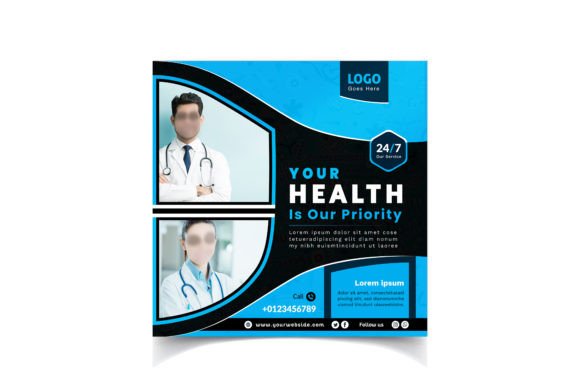
Mastering Medical Social Media Post Design for Professional Healthcare Marketing
In the rapidly evolving landscape of digital healthcare communication, visual consistency and technical precision are not merely aesthetic preferences; they are foundational elements of brand trust. Medical Social Media Post Design serves as a critical bridge between complex medical information and public understanding. For professionals ranging from clinic administrators to independent health educators, the ability to produce high-quality, compliant, and visually engaging content is essential. This article explores the practical implementation of professional design templates, focusing on technical specifications, workflow integration, and the strategic advantages of using standardized assets in your daily operations.
Understanding the Technical Foundation
Before diving into creative execution, it is vital to understand the technical framework that ensures your content performs correctly across various platforms. A professional Medical Social Media Post Design template is built on specific parameters that guarantee clarity and compatibility. The standard dimension of 1080px x 1080px is the industry benchmark for square social media posts, ensuring optimal display on Instagram, Facebook, and LinkedIn feeds without cropping or distortion.
The resolution specification of 300 DPI (dots per inch) is particularly significant. While many social platforms compress images for web display, starting with a high-resolution source file ensures that any repurposing of the asset—such as for printed brochures, high-density displays, or archival purposes—maintains crispness and professional quality. Furthermore, the use of RGB Color Mode is non-negotiable for digital-first content. RGB (Red, Green, Blue) aligns with how screens emit light, ensuring that the colors you see during the design phase match what your audience sees on their devices. Mismanaging color modes by using CMYK (intended for print) can result in dull, inaccurate visuals that undermine the perceived authority of your medical practice.
Integrating Design Assets into Your Workflow
Efficient content creation relies on reducing friction between idea generation and publication. Incorporating pre-designed templates into your workflow allows you to focus on messaging rather than structural layout. Here is how you can integrate these assets effectively:
- Pre-Production Planning: Use the template structure to map out your content calendar. Knowing the exact dimensions and safe zones for text allows you to draft copy that fits naturally, avoiding last-minute resizing issues.
- Rapid Iteration: With fonts already outlined and layers organized, you can swap out text and images quickly. This is crucial for time-sensitive health alerts or trending medical topics where speed is essential.
- Brand Consistency: By sticking to a unified design system, you reinforce brand recognition. Patients and followers begin to associate specific visual cues with your expertise, building long-term trust.
The inclusion of Illustrator AI and EPS files in your source package provides unparalleled flexibility. Unlike raster-based formats, vector files allow you to scale elements infinitely without loss of quality. This is particularly useful if you need to adapt a social post into a larger format for a webinar background or a digital signage display within a clinic. The compatibility with Adobe Illustrator CS ensures that even users with older software versions can access and modify the core design elements.
Managing Fonts and Typography
Typography plays a pivotal role in readability, especially in medical contexts where clarity can impact health decisions. In professional design templates, fonts are often outlined to prevent missing font errors when sharing files across different systems. However, for editing purposes, you will need to know which typefaces were used. Typically, a help text file accompanies the download, providing links to sample fonts or specifying the exact typeface families.
When customizing your Medical Social Media Post Design, adhere to these typographic best practices:
- Prioritize Legibility: Choose clean, sans-serif fonts for body text to ensure readability on small mobile screens.
- Hierarchy Matters: Use bold weights for headlines to grab attention, while keeping supporting information lighter and smaller.
- Contrast is Key: Ensure sufficient contrast between text and background colors to accommodate users with visual impairments, aligning with accessibility standards.
If you replace the outlined fonts with your own brand typography, ensure that the new fonts maintain similar weight and spacing characteristics to preserve the original balance of the design.
Image Handling and Quality Control
Visual imagery in healthcare must be both empathetic and accurate. The template specifies High-Quality JPEG images for preview purposes, but it is important to note that these preview images are not included in the source files. This separation allows you to curate your own imagery that aligns with your specific medical niche and ethical guidelines.
When selecting replacement images, consider the following:
- Authenticity: Use stock photos that depict realistic patient-doctor interactions or diverse demographics to foster inclusivity.
- Resolution Matching: Ensure any new images you import are high-resolution to match the 300 DPI standard of the template. Low-quality images will pixelate when scaled, detracting from the professional appearance.
- Legal Compliance: Always verify licensing rights for any third-party images used. In medical marketing, using unauthorized images of patients or medical procedures can lead to significant legal and reputational risks.
Remember that the JPEG format is ideal for final export due to its balance of quality and file size, making it suitable for fast loading on social media platforms. However, keep your master files in AI or PSD format to retain editability for future updates.
Strategic Implementation Across Platforms
A well-designed medical post is versatile. While optimized for square feeds, the core design elements can be adapted for stories, reels covers, or LinkedIn articles. The key is maintaining the integrity of the original layout while adjusting for platform-specific nuances. For instance, when repurposing a post for Instagram Stories, you might need to reposition key text elements to avoid being obscured by interface icons like the "swipe up" or reaction buttons.
For entrepreneurs and small business owners in the health sector, this efficiency translates to cost savings. Instead of hiring a designer for every single post, you can empower internal team members to produce consistent, high-quality content using these standardized templates. This democratization of design allows for more frequent posting, which is crucial for algorithm visibility and audience engagement.
Long-Term Value and Maintenance
Investing in a robust Medical Social Media Post Design system is a long-term strategy. As your practice or brand evolves, your visual identity may need subtle updates. Having access to editable vector files means you can tweak color palettes, update logos, or modify layout structures without starting from scratch. This scalability ensures that your marketing materials grow with your business.
Additionally, maintaining an organized library of these templates facilitates collaboration. If you work with external agencies or freelance marketers, providing them with standardized AI/EPS files ensures that all output remains on-brand. It reduces the back-and-forth typically associated with design revisions and accelerates the approval process.
Final Thoughts on Execution
The success of your digital presence hinges on the seamless integration of form and function. By leveraging professionally structured templates with precise specifications like RGB color mode, 300 DPI resolution, and vector scalability, you elevate the perceived value of your medical services. Focus on clear communication, ethical imagery, and consistent branding to build a loyal and informed audience.
As you implement these designs, remember to review your analytics regularly. Observe which visual styles resonate most with your audience and refine your approach accordingly. The tools are there to support your message; let them enhance your voice rather than define it. Finally, if you find these resources valuable in streamlining your workflow, consider providing feedback or rating the item. Your input helps improve the quality of resources available to the broader community of healthcare communicators and digital creators.