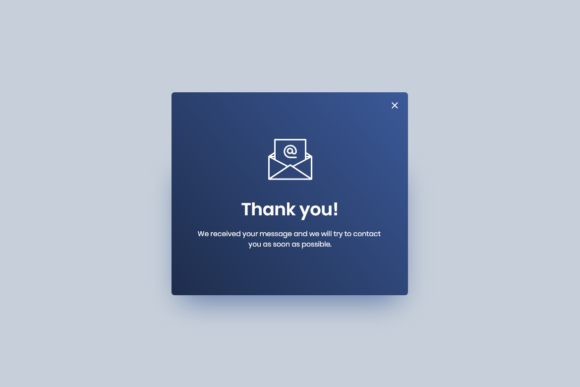
Conformation Lightbox for Adobe XD
Designing user interfaces often involves managing complex interactions, and few elements are as critical yet overlooked as the confirmation dialog. Whether you are building a mobile app, a SaaS dashboard, or an e-commerce platform, users need clear feedback when they perform significant actions. This is where the Conformation Lightbox - Adobe XD asset becomes an invaluable resource for designers at any skill level. It streamlines the process of creating professional-grade modal windows, ensuring that your prototypes look polished and function logically without requiring hours of manual setup.
For many creators, starting from scratch can be time-consuming. You might spend valuable minutes aligning buttons, choosing appropriate typography, and ensuring the overlay opacity feels right. By utilizing a pre-built, high-quality template, you bypass these repetitive tasks. The primary appeal of this tool lies in its efficiency. It allows you to focus on the broader user experience and flow of your application rather than getting bogged down in the pixel-perfect details of a single UI component. This balance between speed and quality is essential for freelancers and agency teams working under tight deadlines.
Why Organization Matters in Design Assets
One of the most frustrating experiences in digital design is opening a file only to find a chaotic mess of unnamed layers. It slows down workflow and increases the likelihood of errors. The Conformation Lightbox - Adobe XD addresses this pain point directly by offering a well-organized structure. Every element is placed in layers with clear, descriptive names. This attention to detail might seem minor, but it significantly impacts how easily you can navigate the file.
When layers are named correctly, you know exactly what you are editing. If you need to change the background color of the modal, you do not have to hunt through a stack of generic rectangles. Instead, you can quickly locate the specific layer, make your adjustment, and move on. This level of organization is particularly beneficial for beginners who are still learning the interface of Adobe XD. It serves as a practical example of best practices in file management, teaching users how to structure their own projects for better collaboration and future edits.
Furthermore, clear labeling supports teamwork. If you are handing off a design to a developer or collaborating with another designer, they will appreciate the clarity. They can understand the hierarchy of elements instantly, which reduces miscommunication and speeds up the development process. A clean file structure reflects professionalism and respect for the people who will work with your designs after you.
Flexibility and Ease of Customization
No two projects are identical, and a rigid template rarely fits every brand identity. The strength of this lightbox component is its full editability. It is designed to be adaptable, allowing you to modify texts, fonts, colors, and layout elements with ease. Whether your brand uses a playful, rounded sans-serif font or a serious, traditional serif, you can swap out the typography in seconds.
Color customization is equally straightforward. You might need a warning modal with red accents for a delete action, or a success modal with green tones for a completed transaction. Because the elements are vector-based and fully editable, changing the color scheme does not degrade the quality of the design. You can also move or remove elements as needed. If your specific use case does not require a secondary "Cancel" button, you can simply delete it without breaking the layout. This flexibility ensures that the asset remains useful across a wide variety of design scenarios.
The format is native to Adobe XD, which means there are no compatibility issues or complex import processes. You open the file, and it is ready to use. This seamless integration is crucial for maintaining a smooth workflow. You do not need to convert files or worry about missing assets. Everything is contained within the XD environment, leveraging its powerful prototyping features to create interactive demonstrations of how the lightbox behaves when triggered.
Visual Quality and Technical Specifications
Visual fidelity is non-negotiable in modern web and app design. Users expect crisp, clean interfaces that look good on high-resolution screens. The Conformation Lightbox - Adobe XD is delivered at a high quality of 72 dpi, which is the standard resolution for digital displays. This ensures that text remains sharp and edges are clean, providing a professional appearance that enhances the credibility of your prototype.
While 72 dpi is standard for screen-based design, the vector nature of Adobe XD means that elements can be scaled without losing clarity. This is particularly important when designing for responsive layouts. You might need to adjust the size of the lightbox for a tablet view versus a desktop view. With vector graphics, you can resize components freely, knowing that they will remain crisp and legible. This technical reliability gives you confidence that your design will translate well across different devices and screen sizes.
Practical Use Cases for Designers and Businesses
Understanding where to apply this tool helps maximize its value. For entrepreneurs and small business owners creating their own websites, this lightbox can be used for newsletter sign-ups, cookie consent notices, or age verification gates. These are common requirements that often clutter the design process if built from scratch. Having a ready-made solution allows non-designers to implement professional-looking features quickly.
For professional UX/UI designers, the asset is ideal for rapid prototyping. When presenting concepts to clients, you need to demonstrate functionality without spending days on high-fidelity details for every single state. Using a pre-built confirmation dialog allows you to showcase the user flow effectively. You can demonstrate what happens when a user clicks "Delete Account" or "Submit Order," providing a realistic preview of the final product.
Educators and students can also benefit from this resource. In a classroom setting, it serves as a teaching aid to explain the importance of modal windows in user interface design. Students can deconstruct the file to see how shadows, overlays, and button states are constructed. It provides a tangible example of industry-standard design techniques, bridging the gap between theoretical knowledge and practical application.
Considerations Before Implementation
While the Conformation Lightbox - Adobe XD is a powerful tool, it is important to consider how it fits into your specific project. Always ensure that the style of the lightbox aligns with your overall design system. If your app uses a dark mode, you will need to invert the colors of the modal to maintain consistency. Similarly, check the accessibility of your text contrast after making customizations. High-quality design is not just about aesthetics; it is about usability for all users.
Additionally, remember that this is a design asset, not code. While it helps you visualize the interaction, you will still need to communicate the behavior to developers clearly. Use Adobe XD’s prototyping tools to link the lightbox to trigger events, such as button clicks. This creates an interactive prototype that demonstrates the intended behavior, making it easier for developers to understand the logic behind the design.
In conclusion, incorporating a well-structured, editable, and high-quality confirmation lightbox into your workflow can save time and elevate the professionalism of your designs. By leveraging the Conformation Lightbox - Adobe XD, you free up mental energy to focus on solving bigger user experience challenges, ensuring that your final product is both functional and visually appealing.