13 Creative Pricing Plan UI Elements
Presenting your services clearly is one of the most critical aspects of converting a visitor into a paying customer. When potential clients land on your website, they are often scanning for two things: what you offer and how much it costs. If this information is buried in dense paragraphs or presented in a confusing layout, you risk losing their interest immediately. This is where well-designed 13. Pricing Plan UI Elements come into play. These assets are not just decorative; they are functional tools designed to streamline the decision-making process for your users while enhancing the visual appeal of your digital presence.
Why Visual Clarity Matters in Service Presentation
In the digital age, attention spans are short. Users expect to find information quickly and intuitively. A cluttered or outdated pricing table can signal poor attention to detail, potentially undermining trust in your brand. Conversely, a clean, modern, and organized pricing structure communicates professionalism and transparency. By utilizing creative and colorful pricing plan UI elements, you guide the user’s eye to the most important information without overwhelming them. The goal is to reduce cognitive load, allowing visitors to compare options effortlessly and choose the package that best suits their needs.
The 13. Pricing Plan UI Elements kit is specifically crafted to address these challenges. It provides a foundation for building pricing tables that are both aesthetically pleasing and highly functional. Whether you are a freelancer showcasing your packages, a SaaS company listing subscription tiers, or an educator offering course bundles, these elements provide the flexibility needed to match your unique brand identity.
Key Features of the Design Kit
One of the standout qualities of this resource is its balance between simplicity and customization. The design philosophy centers on a simple, clean, and modern aesthetic. This ensures that the pricing tables do not clash with the rest of your website’s design but rather complement it. Here are the core characteristics that make this kit particularly useful for designers and developers:
- Fully Organized Layers: Time is money, especially when working on client projects or tight deadlines. The source files are meticulously organized, meaning you can easily locate specific elements such as buttons, text fields, icons, or background shapes. This structure significantly speeds up the editing process.
- Easy Color Customization: Branding consistency is vital. With this kit, changing the color style is straightforward. You can adjust hues, saturation, and brightness to align perfectly with your corporate palette or personal brand guidelines. This flexibility allows you to create multiple variations for A/B testing or different seasonal promotions.
- Adobe Photoshop Compatibility: The source file format is PSD, which remains an industry standard for graphic design. If you are familiar with Adobe Photoshop, you will find the workflow intuitive. The use of smart objects and layer styles ensures that edits are non-destructive, preserving the quality of the original design.
- Google Fonts Integration: Typography plays a huge role in readability and tone. The design utilizes Google Fonts, which are widely accessible, web-safe, and offer a vast range of styles. This ensures that your pricing tables look consistent across different devices and browsers.
- RGB Color Mode: Designed specifically for digital screens, the RGB color mode ensures that colors appear vibrant and accurate on monitors, tablets, and smartphones.
Practical Applications Across Industries
The versatility of 13. Pricing Plan UI Elements makes them suitable for a wide array of professional and creative environments. Let’s explore how different users can leverage these tools to enhance their online presence.
For Entrepreneurs and Small Business Owners
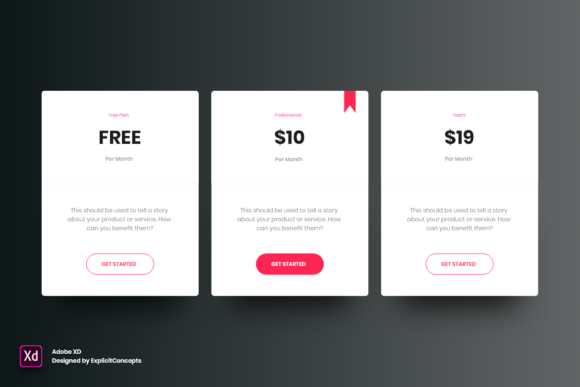
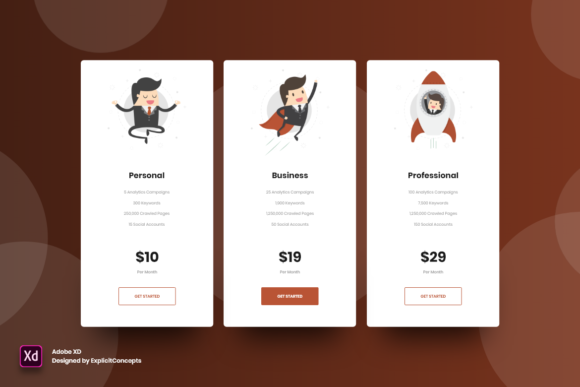
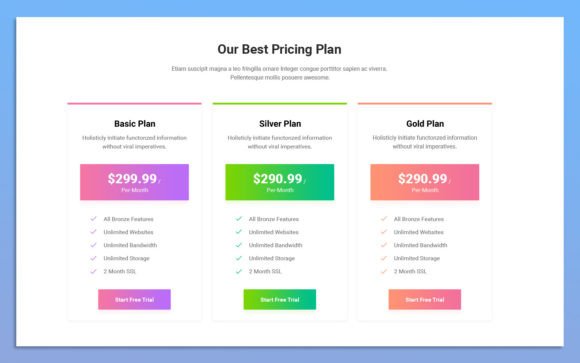
If you run a service-based business, such as consulting, coaching, or digital marketing, your pricing page is often the final hurdle before a sale. Using these UI elements, you can create distinct tiers—such as "Basic," "Professional," and "Enterprise"—that clearly outline what is included in each package. The colorful design helps differentiate the tiers, making it easier for clients to see the value proposition of higher-priced options. For instance, you might highlight the middle tier with a brighter accent color to nudge users toward your most popular package.
For Freelancers and Creatives
Freelancers, including graphic designers, writers, and developers, often struggle with presenting their rates in a way that feels professional yet approachable. A static text list of prices can feel rigid. By implementing these creative UI elements, freelancers can showcase their services in a dynamic format. You can include icons representing specific deliverables, such as "Logo Design," "Brand Guidelines," or "Social Media Assets," making the scope of work visually apparent. This clarity helps manage client expectations and reduces the back-and-forth emails regarding what is included in the fee.
For Educators and Course Creators
The e-learning sector has exploded in recent years. Educators selling online courses, workshops, or membership subscriptions need clear pricing structures. These UI elements can be adapted to show monthly versus annual billing options, or to compare self-paced courses against live mentorship programs. The clean design ensures that complex information, such as module breakdowns or bonus materials, is presented in an digestible format.
For App Developers and SaaS Companies
Software-as-a-Service platforms rely heavily on subscription models. The 13. Pricing Plan UI Elements are ideal for displaying feature comparisons across different user levels. You can easily toggle checkmarks or crosses to indicate feature availability. The modern design language fits seamlessly into contemporary web applications, ensuring that the pricing page feels like an integrated part of the product experience rather than an afterthought.
Enhancing User Experience and Conversion
Beyond aesthetics, the primary benefit of using high-quality UI elements is the improvement of user experience (UX). A well-structured pricing table reduces friction. When users can easily compare features and prices, they feel more confident in their purchase decision. This confidence translates directly into higher conversion rates.
Moreover, the ability to customize colors and styles allows for strategic psychological cues. For example, using a contrasting color for the "Call to Action" button draws immediate attention. Similarly, using whitespace effectively prevents the page from feeling cluttered, which can cause anxiety or hesitation in potential buyers. The fully editable nature of the PSD files means you can tweak these psychological triggers based on user feedback and analytics data.
Considerations for Implementation
While the 13. Pricing Plan UI Elements provide a strong starting point, successful implementation requires thoughtful consideration. First, ensure that the text content you insert is concise. Even the best design cannot save a pricing table filled with jargon or overly long descriptions. Keep your value propositions punchy and clear.
Second, consider responsiveness. While the PSD file is designed for visual layout, remember that your final web implementation must be mobile-friendly. Test how your chosen colors and fonts translate to smaller screens. The use of Google Fonts helps here, as they scale well, but always verify legibility on mobile devices.
Finally, maintain consistency. If you change the color scheme of your pricing table, ensure it aligns with the rest of your website. Inconsistent branding can confuse users and dilute brand recognition. Use the easy-to-change color features to harmonize the pricing section with your header, footer, and primary navigation elements.
In conclusion, investing time in creating a compelling pricing presentation is essential for any digital service provider. The 13. Pricing Plan UI Elements offer a practical, efficient, and visually striking solution. By leveraging these customizable, organized, and modern design assets, you can create a pricing experience that not only looks professional but also drives results. Whether you are updating an existing site or launching a new venture, these tools provide the flexibility and polish needed to stand out in a crowded digital marketplace.